

Create your statement
1
Open the generator
Go to PROVE → Accessibility Statement.
2
Fill in the details
Under Set up and customize your Accessibility Statement, enter:
- Website name (required): appears in the title of the statement
- Contact Information (required): Contact email, Contact phone, and Address where visitors can report problems
- Number of business days to respond, for example 5
- Last audit date
3
Check the preview
The preview on the right updates as you type. Switch between Text and HTML.
4
Save
Click Save Settings.
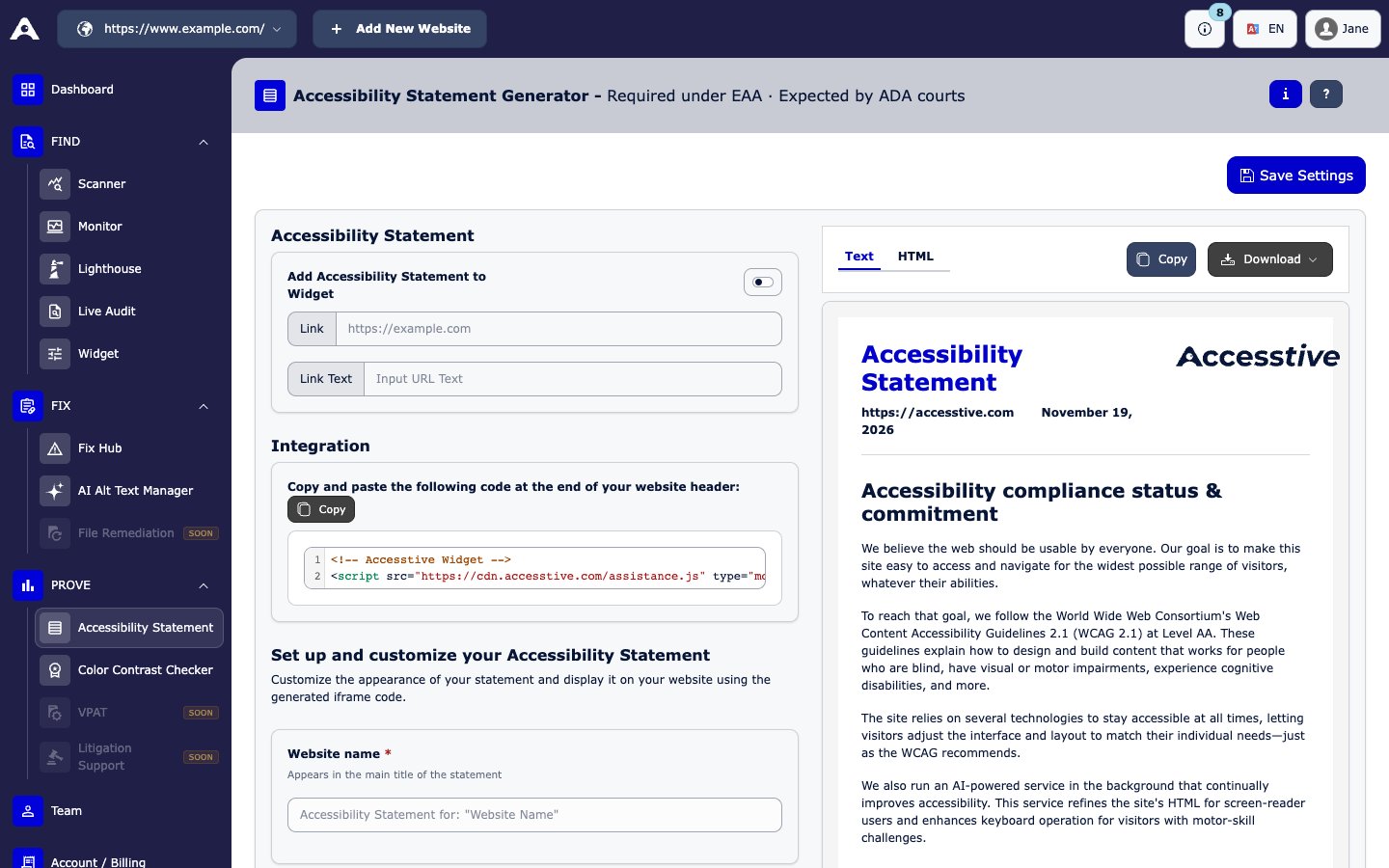
PROVE → Accessibility Statement
Put the statement on your website
Choose one way:- Copy the text or HTML and paste it into a page on your website.
- Download it as HTML (Download HTML) or plain text (Download Text).
- Use the code under Integration. Paste it at the end of your website header.
Show the statement in the widget
- Turn on Add Accessibility Statement to Widget.
- Enter the Link to the page with your statement, and the Link Text visitors should see.
- Click Save Settings.
A statement documents your work and your contact options. It is not proof of legal compliance. Keep it up to date after each audit.