

The AI Alt Text Manager needs the Accessibility Widget on your website. AI features use AI tokens from your plan. The Solo plan has no AI tokens, so the AI switch is hidden there.
Create alt text
1
Open the module
Go to FIX → AI Alt Text Manager.
2
Choose a page
Click a page in the page tree.
3
Turn on AI alt text
Switch on Enable AI alt text for this page. The images of the page load into a table with URL, AltText, and Actions. The page shows how many images have Missing alt text.
4
Create or edit the text
For one image, click Generate alt text with AI, or click Edit alt text to write it yourself. Then click Save alt text.
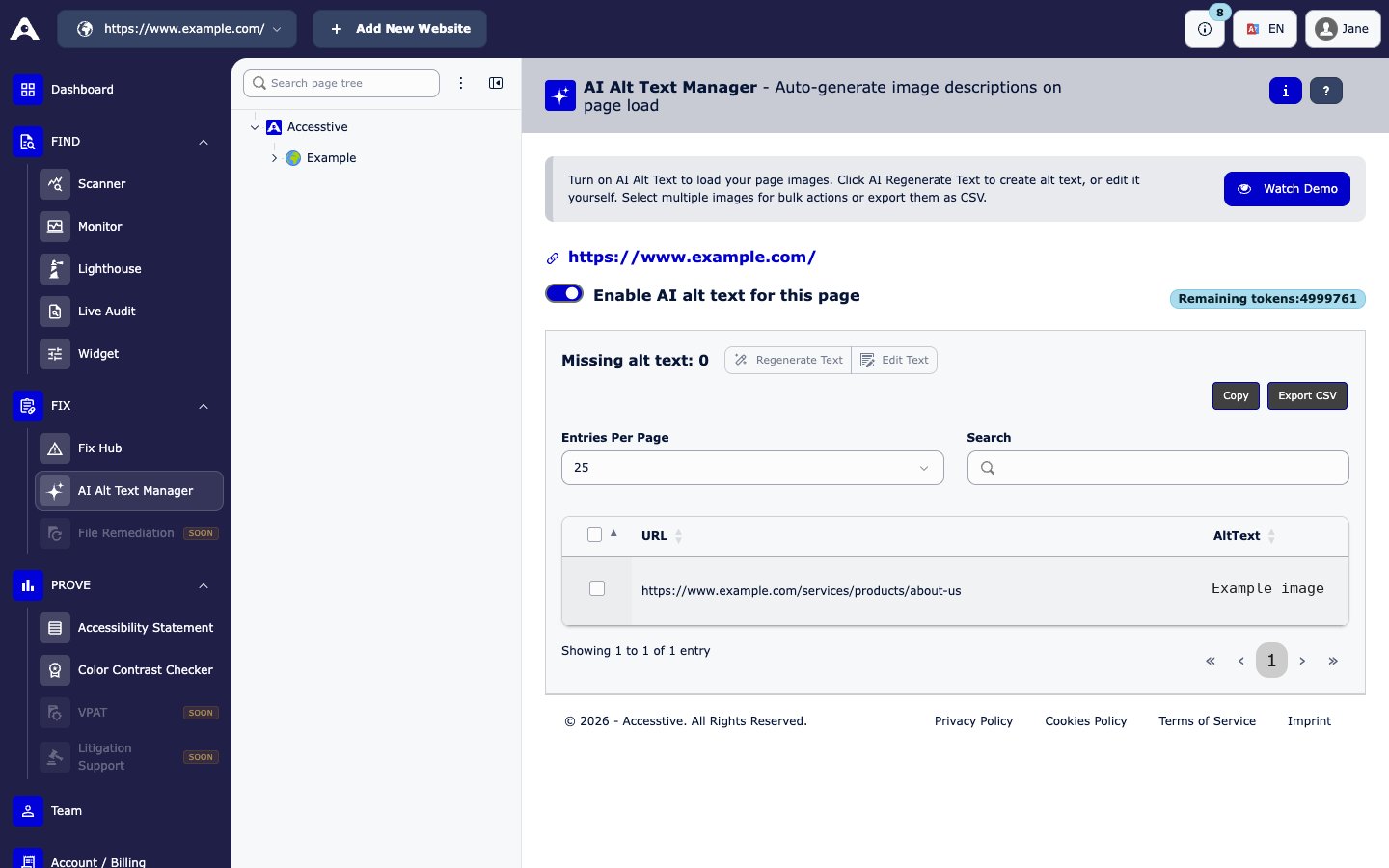
FIX → AI Alt Text Manager
Work on many images at once
- Tick the images you want to change.
- Click Regenerate Text to create alt text with AI, or Edit Text to write it yourself.
- Click Save selected.
Tips for good alt text
- Describe what the image shows and why it matters on the page.
- Keep it short, usually one sentence.
- Do not start with “Image of”.
- Always check AI text before you save it.